For many PC users, the mouse pad remains an often-overlooked component of their setup. Yet, in the competitive worlds of gaming and demanding professional tasks, the surface beneath your mouse can drastically impact performance, comfort, and even overall desk aesthetics. The rise of larger, more expansive surfaces, often termed “large mouse pads” or “gaming mats,” has shifted the conversation from mere mouse movement to a comprehensive desk solution. This article will explore the nuances between these terms, delve into their benefits, material differences, and ultimately guide you toward choosing the ideal surface for your needs.
Understanding the Terminology: Large Mouse Pads and Gaming Mats
While the terms “large mouse pad” and “gaming mat” are frequently used interchangeably, they essentially refer to the same category of extended desk surfaces that go beyond a traditional, smaller mouse pad. Historically, mouse pads were compact squares or rectangles, designed solely for mouse tracking. However, as gaming became more competitive and setups evolved, the demand for expansive surfaces grew. These larger mats are engineered to accommodate not just the mouse but also the keyboard and other peripherals, creating a unified and stable workspace. They aim to provide an uninterrupted surface for broad mouse movements, crucial for certain playstyles, and to enhance the overall user experience.
Dimensions and Desk Coverage: The Size Advantage
The most defining characteristic of these products is their size. Unlike small or medium pads that offer limited space, large mouse pads and gaming mats typically come in “extended,” “XXL,” “3XL,” or even “5XL” dimensions. Common sizes range from 900x400mm (approximately 35×16 inches) to massive 1600x800mm (63×31.5 inches) surfaces that can cover almost an entire desk.
This expansive real estate offers several significant advantages. For low-DPI (Dots Per Inch) gamers, who require sweeping arm movements for precision, a large mat ensures they never run out of tracking space, eliminating the need to lift and reposition the mouse mid-action. Beyond performance, these mats provide a cohesive aesthetic, unifying the desk by placing both keyboard and mouse on a single surface, which also prevents keyboard slippage during intense use. Furthermore, a thick, large mat acts as a protective barrier for your desk, safeguarding it from scratches, spills, and general wear and tear, while also dampening keyboard sounds. Choosing the right size ultimately depends on your available desk space and whether you prioritize maximum coverage or a more focused, compact area for your peripherals.
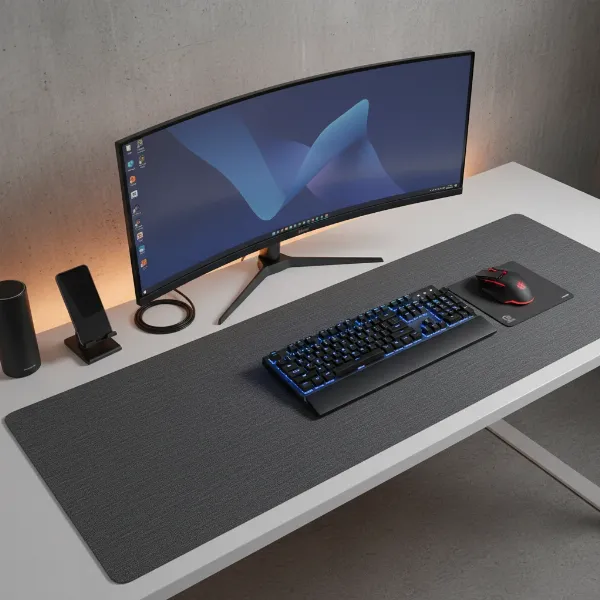 A large gaming mat covering a spacious desk with a keyboard, mouse, and monitor, illustrating ample space for movement and a unified aesthetic.
Surface Types: Speed, Control, and Hybrid Performance
The surface of a large mouse pad or gaming mat is critical in dictating mouse responsiveness and overall feel. Manufacturers engineer surfaces to cater to different user preferences, primarily categorized into speed, control, and hybrid types.
Speed Surfaces
|
Our Picks for the Best Large mouse pad in 2026
As an Amazon Associate I earn from qualifying purchases.
|
||
| Num | Product | Action |
|---|---|---|
| 1 | SteelSeries QcK Large Gaming Mousepad — Black — Non-Slip Silicone Rubber Base — Peak Tracking and Stability — Optimized for Gaming Sensors — 490 mm x 420 mm — FPS, MOBAs, RTS, MMO |

|
| 2 | Mouse Pad, Large Gaming Mouse Pad with Double Stitched Edges, 14.9 x 11.7 inches Premium-Textured & Waterproof Mousepad, Nonslip Natural Rubber Base Mouse pad for Laptop,Computer, Office, Black |
|
| 3 | Razer Gigantus V2 Cloth Gaming Mouse Pad (XXL): Thick, High-Density Foam - Non-Slip Base - Classic Black |
|
| 4 | Amazon Basics Large Extended Computer Rectangular Mouse Pad, 16.7 x 35.7 inch, Black |
|
| 5 | Large Gaming Mouse Pad, 31.5x15.7 inch Large Extended Computer Keyboard Mouse Mat, Water Resist Non-Slip Mousepad Rubber Base Long XXL Desk Mouse Pad for Work & Gaming, Office & Home, Black |
|
| 6 | SteelSeries QcK Gaming Mouse Pad - XXL Cloth - Peak Tracking and Stability - Esports Mousepad - Never-Slip - Full Desk Coverage |
|
| 7 | TEDNETGO Large Gaming Mouse Pad, Waterproof Extra Large Big Mouse Pad with Stitched Edge, XXL Non-Slip Black Computer Long Mousepad Desk Mat for Gamer, Office & Home, Black |
|
| 8 | Aothia Non-Slip Waterproof PU Leather Desk Pad Protector for Mouse, Writing Desk, Office, Home, Laptop Blotter, 23.6" x 13.7", Black |
|
| 9 | Large Extended Gaming Mouse Pad with Stitched Edges, (31.5X15.7In) Durable Non-Slip Natural Rubber Base, Waterproof Computer Keyboard Pad Mat for Esports Pros/Gamer/Desktop/Office/Home-Black |
|
| 10 | KTRIO Large Gaming Mouse Pad Desk Mat, Superior Micro-Weave Cloth for Precise Mouse Control, Non-Slip Rubber Base, Stitched Edges, Water-Resistant, for Gamer, Office & Home, 31.5" x 11.8" inches |
|
Speed surfaces are designed for minimal friction, allowing for rapid, effortless mouse glides. These typically feature ultra-smooth cloth, coated fabrics, hard plastics, or even glass. They are ideal for high-DPI gamers or those who play fast-paced genres like MOBAs (Multiplayer Online Battle Arenas) or RTS (Real-Time Strategy) games, where quick cursor movements across the screen are paramount. While offering superior speed, they provide less stopping power, meaning precise micro-adjustments might require a delicate touch.
Control Surfaces
In contrast, control surfaces emphasize precision and stopping power. They often have a textured or micro-woven cloth finish, which creates more friction and resistance. This added drag allows for highly accurate, deliberate movements, making them a favorite among FPS (First-Person Shooter) players who rely on pixel-perfect aiming at lower DPI settings. Control pads are more forgiving for minor mistakes and offer a greater sense of stability.
Hybrid Surfaces
Hybrid, or balanced, surfaces aim to offer the best of both worlds. These mats combine elements of speed and control, providing a moderate glide speed with enough resistance for precise stopping. Often featuring unique blends of materials like Cordura fabric, they cater to versatile gamers or professionals who switch between tasks requiring both rapid movement and meticulous accuracy. This versatility makes them a popular choice for users seeking a balanced experience without compromising too heavily on either speed or control.
“The perfect mouse pad surface isn’t about one being inherently ‘better’ than another; it’s about matching the surface characteristics to your individual playstyle and sensitivity. A control pad for an FPS player is like a racing slick for a drag car – specialized for a specific purpose.” – Alex “Apex” Chen, Esports Peripheral Analyst
Material Matters: Durability, Comfort, and Grip
Beyond surface texture, the materials used in large mouse pads and gaming mats significantly influence their durability, comfort, and how securely they stay put on your desk.
Cloth (Fabric) Pads
Cloth mouse pads are the most prevalent type, often made from polyester, Lycra, or high-density fabric. They are praised for their comfort, softness to the touch, and shock-absorbing properties, which can reduce wrist pressure during extended use. Cloth surfaces generally provide excellent control and consistent tracking for both optical and laser mice. While offering a good balance of speed and control, their main drawbacks can be durability, as they are prone to fraying and linting over time, and a greater challenge in cleaning compared to hard surfaces. However, many modern cloth pads feature reinforced stitched edges to combat fraying.
Hard Pads (Plastic, Aluminum, Glass)
Hard mouse pads, crafted from materials like plastic, aluminum, or glass, offer a distinct set of characteristics. Their smooth, rigid surfaces excel in providing high-speed glides with minimal friction, making them ideal for swift movements. They are generally very durable, resistant to wear and tear, and exceptionally easy to clean with a simple wipe. However, hard pads can sometimes be noisy due to mouse movement, may wear down mouse skates faster, and some users find them less comfortable for long sessions due to their unforgiving nature. Glass pads, while offering extreme speed and durability, are often more expensive and can be fragile if dropped.
The Essential Rubber Base
Regardless of the surface material, almost all quality large mouse pads and gaming mats feature a rubberized anti-slip base, typically made from natural or synthetic rubber. This base is a crucial component, providing excellent stability and preventing the mat from shifting or sliding, even during the most frantic gaming moments. A good rubber base also contributes to comfort and helps protect the desk surface. It ensures that the mat remains a steadfast foundation for your peripherals, allowing for uninterrupted and precise control.
Top Contenders: Leading Brands in the Mouse Pad Arena
The market for large mouse pads and gaming mats is vibrant, with numerous brands offering a wide array of products catering to diverse needs. Established peripheral giants like SteelSeries are renowned for their QcK line, which includes a vast range of sizes and surface types (Speed, Control, Balance), often featuring durable, micro-woven cloth. Razer also holds a strong presence with products like the Gigantus and Goliathus, offering both cloth and hybrid options, sometimes with integrated RGB lighting for aesthetic appeal.
Logitech‘s G series mouse pads, such as the G840, are often praised for their balance of speed and control in large formats. Other notable brands contributing to the segment include Corsair with their MM series (e.g., MM300, MM700 RGB), HyperX with their Pulsefire mats, and Glorious with their Elements series, which features unique hybrid surfaces like “Ice” (hybrid glass cloth). Enthusiast brands like Artisan are also highly regarded for their premium, high-performance cloth pads that focus on specific glide and control characteristics, often favored by competitive gamers. These brands continually innovate, offering various textures, thicknesses, and features to provide an optimized surface for every user.
Choosing Your Ideal Battleground: Key Considerations
Selecting the best large mouse pad or gaming mat isn’t a one-size-fits-all decision; it hinges on a blend of personal preference and practical requirements.
- Gaming Style and DPI: Consider your mouse sensitivity and preferred game genres. Low-DPI FPS players benefit most from large control surfaces, allowing broad, precise movements. High-DPI MOBA/RTS players might prefer speed surfaces for quick cursor repositioning. Hybrid options offer a middle ground for versatile players.
- Desk Size and Aesthetics: Measure your desk to ensure the mat fits comfortably without obstructing other items. Also, think about the visual impact. Do you want a minimalistic black mat, a vibrant design, or one with RGB lighting to complement your setup? A large mat can significantly define your workspace’s look.
- Budget: Prices vary widely based on size, material, brand, and features like stitched edges or RGB. Determine how much you’re willing to invest, but remember that a quality mat is a long-term investment in comfort and performance.
- Comfort and Ergonomics: If you spend long hours at your desk, comfort is paramount. Thicker cloth pads often provide more cushioning and wrist support.
- Durability and Maintenance: Consider how much wear and tear your mat will endure. Hard pads are generally more durable and easier to clean, while cloth pads, especially those with stitched edges, can still offer good longevity with proper care. Think about how often you’re willing to clean it.
Keeping It Pristine: Cleaning and Maintenance Tips
Maintaining your large mouse pad or gaming mat is crucial for preserving its performance, aesthetics, and longevity. Regular cleaning prevents dirt, dust, and oils from affecting mouse tracking and overall feel.
For most cloth pads, a simple routine of dusting with a soft brush or lint roller can keep surface grime at bay. For a deeper clean, hand washing is highly recommended. Lay the mat flat in a bathtub or large sink, immerse it in cold water (hot water can damage the rubber base or surface), and apply a small amount of mild soap, such as hand soap or diluted dish soap. Gently scrub the surface with your fingertips or a soft-bristle toothbrush, focusing on soiled areas. Rinse thoroughly with cold water until all soap residue is gone. After washing, pat the mat dry with a clean towel and then lay it flat or hang it to air dry for 24-36 hours, away from direct sunlight or heat sources like hair dryers, which can cause warping. Some cloth pads are machine washable; if yours is, use cold water on a delicate or low-tumble cycle with similar colors and no fabric softener, then air dry.
Hard surface pads are significantly easier to clean. A simple wipe-down with a damp cloth and a mild all-purpose cleaner is usually sufficient to remove dirt and smudges. Ensure the mat is completely dry before placing your mouse back on it. Regardless of the material, avoiding eating or drinking directly over your mat can prevent many common stains and spills.
Conclusion
The choice between a “large mouse pad” and a “gaming mat” is less about distinguishing two different products and more about recognizing the evolution of the humble mouse pad into an essential, desk-spanning performance accessory. Both terms effectively describe the expansive surfaces that offer unparalleled space, enhanced precision, improved ergonomics, and a unified aesthetic for any desk setup. Whether you’re a competitive gamer relying on pixel-perfect aim or a professional seeking superior comfort and organization, investing in a high-quality, large-format mat can significantly elevate your experience. By carefully considering your gaming style, desk environment, and material preferences, you can find the perfect surface to support your mouse and transform your workspace into an optimized battleground for work and play. Which will you choose to conquer your desk?
Frequently Asked Questions
What are the main benefits of a large mouse pad or gaming mat?
Large mouse pads offer enhanced precision for sweeping mouse movements, improved comfort and wrist support for extended sessions, a unified surface for both keyboard and mouse that prevents slippage, and protection for your desk. They cater especially well to low-DPI gamers who need ample space.
Are gaming mats truly different from large mouse pads?
No, the terms “gaming mat” and “large mouse pad” are largely synonymous in modern usage, referring to extended, desk-covering surfaces designed to optimize performance and aesthetics for both gaming and productivity. The distinction often lies in marketing rather than fundamental design.
What’s the best surface type for FPS games?
For FPS games, a control-oriented surface is generally recommended. These textured cloth pads offer more friction and stopping power, allowing for precise, deliberate movements crucial for accurate aiming at lower mouse sensitivity settings.
How do I know if I need a speed or control mouse pad?
If you prefer fast, sweeping movements and play genres like MOBAs or RTS games, a speed pad is likely best. If you prioritize precision, make smaller, more deliberate movements, and play FPS games, a control pad would be more suitable. Hybrid pads offer a balanced experience for versatile users.
Can I machine wash my cloth gaming mat?
Many cloth gaming mats are machine washable. It’s crucial to use cold water, a delicate or low-tumble cycle, and mild detergent without fabric softener. Always air dry the mat flat, away from direct heat, for 24-36 hours to prevent damage or warping. Check the manufacturer’s instructions if available.
Do large mouse pads protect my desk?
Yes, large mouse pads and gaming mats act as an excellent protective layer for your desk surface. They shield it from scratches, scuffs, spills, and the general wear and tear that can occur from daily use of a mouse, keyboard, and other peripherals.